
6. MailOut
GDPR Filters in Mail-Out
The Mail-Out system lets you send emails to members, just like a small mailing list manager.
To ensure clubs stay GDPR-compliant, Mail-Out already incorporates two opt-outs that are on the main Member Record which will prevent emails being sent to members who have opted out of either Newsletters or Regional Organiser communications.
This article covers how you can target newsletters (assuming they are opted in to receiving newsletters) to members who have selected certain GDPR consent options.
Using our earlier Yearbook scenario as an example, a club might wish to remind members that the time to create the new Yearbook is coming soon and they they previously opted in and give them the opportunity to change their preferences if they wish.
Alternatively the club could email all members who opted out, or have not yet consented either way, to consider opting in to receive the Yearbook.
Who can use GDPR Filters in Mail-Out?
Just like the Member Report, GDPR Filters are only available to:
- Admins
- Membership Secretaries
- Committee-level officers with permission
Regional organisers cannot use GDPR Filters.
This ensures that consent information is only accessed by those responsible for data compliance.
Opening the GDPR Filters in Mail-Out
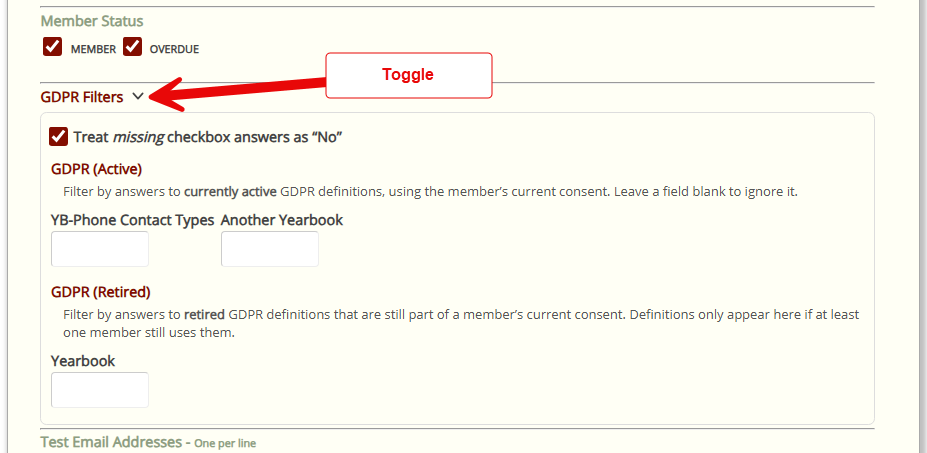
Inside the audience selection area of MailOut, you’ll see a toggle labelled GDPR Filters.
When you expand it, you will see two lists:
- GDPR (Active)
- GDPR (Retired)
These come directly from your club’s GDPR setup and refer to the Consent Option Definitions.
Both Active and Retired filters work only on each member’s current consent record. Historic consents and old policy versions are not used for these filters – they always reflect the member’s latest consent.
Active Consent Options
These are consent options that are currently marked as active in GDPR setup (they have not been retired). They may or may not appear in the current policy text, but they are still considered “live” options in the system, and members can still have current answers recorded against them.
Legacy Consent Options
These are retired consent options. They usually come from older versions of your policy. Crossmember only shows legacy options here if at least one current member still has that option answered on their current consent record. This allows you to search using older options that are no longer in use, but are still present in members’ current agreements.
Members found with Legacy Consent Options ought to reconsent in the near future as the Policy has been updated.
Treat missing checkbox answers as No
Answering “No” to a Consent Option – or not ticking a checkbox, is an explicit opt-out for that particular offered service.
If the Crossmember User wishes to filter the member search for unticked responses, then they will select “No” for that field. This will MailOut to all members who explicitly opted out.
If the Treat missing checkbox answers as “No” is also ticked, then the GDPR Filter behaves in a very special way. It will also assume that any member that has not even answered the question – they have yet to consent to that particular Consent Option, then this is also treated as “No”. It is an implicit opt-out. Therefore all explict and implicit opted out members will be used by MailOut.
How the filters work
The filters are presented as drop-down lists.
- A checkbox option will be selectable as Yes or No
- Multi-Select and Drop-down options will be selectable as one item from the defined list.
When you select something, you are saying:
“Show me members who chose this option.”
Behind the scenes, Crossmember uses AND logic.
This means:
- If you select one filter, you’ll see everyone who matches it.
- If you select two filters, you’ll only see members who match both choices.
- The more filters you tick, the smaller the resulting list becomes.
This prevents accidental over-sending and ensures only the correct members receive the message.
4. Why this matters for compliance
Mail-Out is tightly connected to GDPR:
- Members who opted out of contact will never appear in Mail-Out, even before filters are applied
- GDPR Filters narrow the list further based on members’ consent preferences
- This ensures that only members with the right consent options receive the message
This minimises GDPR risk and makes communication more relevant.
5. Summary
- GDPR Filters let officers target members by their consent preferences.
- Filters show both active and retired consent options.
- Only authorised officers can use them.
- Filters use AND logic, so selecting more options narrows the audience.
- In Mail-Out, filters ensure emails only go to members with appropriate permissions.