
4. GDPR Reports
Crossmember provides a set of GDPR-related reports to help clubs stay compliant, respond to member requests, and monitor consent. These reports are designed to be simple and practical, even for officers who may not feel confident with computers.
This article explains each report in turn and what it is used for.
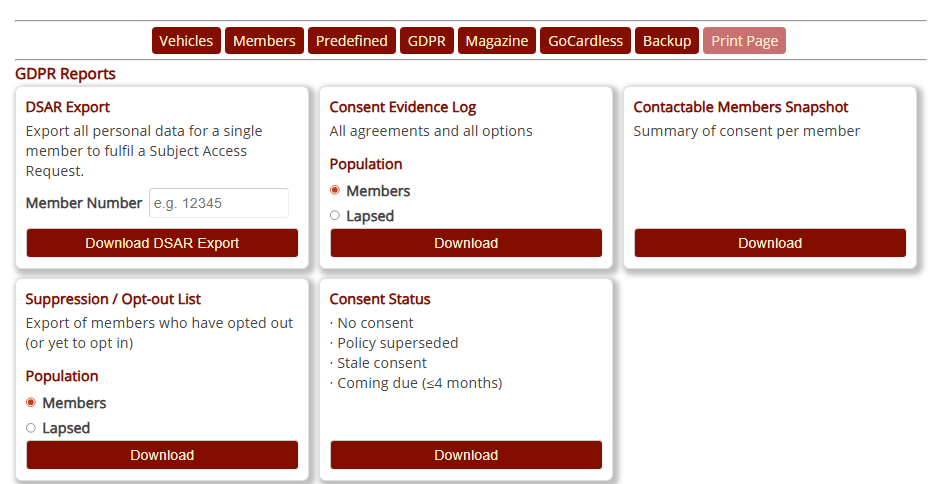
1. DSAR Export
(Data Subject Access Request)
A Data Subject Access Request — often called a DSAR — is a formal right under the UK GDPR.
It means that any member can ask:
“Please show me all the personal information the club holds about me.”
Clubs must respond within one month, and the information must be accurate, complete and easy to understand.
Crossmember makes this easy by providing a DSAR Export:
- It produces a PDF document instantly, ready to download.
- It includes all the personal data your club holds on an individual within Crossmember, organised clearly.
- It is generated live, meaning it always reflects the most up-to-date information.
- You can give the PDF directly to the member as part of your official DSAR response.
This report ensures every club can meet its legal obligations quickly and confidently.
2. Consent Evidence Log
This report shows a timeline of every consent action recorded in Crossmember — for example:
- When the member agreed to the Privacy Policy
- Which policy version they saw
- Whether an admin consented on their behalf
- Any changes caused by new versions of the policy
- Any revocations or special options the member changed
The Consent Evidence Log can be generated for:
- Members only, or
- Lapsed members only
This report is particularly useful if:
- A member challenges how their data is used
- You need to prove when consent was obtained
- The ICO asks for evidence in case of a complaint
- You are checking whether your policies were properly accepted across membership periods
3. Contactable Members Snapshot
This is a one-off snapshot of everyone who can currently be contacted under GDPR rules.
It uses the club’s latest policy and consent records to decide:
- who is fully contactable (email, post or phone)
- who is not contactable
- who may have restrictions based on their consent choices
Clubs often use this report for example:
- Preparing membership-wide emails
- Creating clean mailing lists for third-party mailers
- Quick checks before major announcements
Because it is a snapshot, it reflects the situation at the moment the report is run.
4. Suppression / Opt-Out List
This report shows all members who have said:
“Do not contact me.”
It is available either for:
- Active members, or
- Lapsed members
(but not both together).
Reasons a member appears here include:
- They opted out of certain communication channels
- They expressed a preference not to opt in to a club defined consent option
- They asked to be excluded from general contact
This list is extremely important when preparing large mailings.
You can use this report to ensure no one who has opted out is accidentally contacted.
5. Consent Status Report
(The most useful day-to-day compliance tool)
The Consent Status report is the most advanced and practical GDPR report Crossmember offers.
It is divided into five separate tabs:
1) No Consent
Members who have never consented to your policy.
The most common example of this is members who are on Direct Debit, and have been since before the Club was migrated to Crossmember. They are the highest priority for follow-up.
2) Policy Superseded
Members who consented to an older version of your Privacy Policy and need to confirm the new version.
3) Stale Consent
Members whose consent to the current active policy has expired based on your age/staleness settings.
These people may need to re-consent depending on your club’s chosen rules.
4) Coming Due (Next 4 Months)
Members whose consent will soon become stale.
This gives the membership secretary a head start before problems arise.
5) All Issues (Consolidated)
This final tab combines all four lists above into a single “to-do” list.
It is ideal for officers who want one simple place to track progress.
How the consent lists are ordered
All five tabs are automatically sorted by:
- “Days since last consent”
- Oldest consent first
This means the people who most urgently need attention appear at the top of each list.
As a result, the Consent Status report doubles as a work log:
- Start at the top
- Contact the member or wait for renewal
- Work your way down
- The list reduces as members re-consent
This makes it far easier for membership secretaries to keep the club compliant without special training.
Common Report Headings
| active_policy_version | The version of the currently active policy |
| policy_version_member | The latest version of the policy that the member has consented to |
| agreed_at | The date / time that the policy was agreed |
| capture_method | How the consent was obtained. Can include: migration: Brought into the new format with the software upgrade to version 6.0.0. Method of capture was not previously identified. import: Imported from club data via upload in_person: Admin is consenting on behalf of member and is with the member phone: Admin is consenting on behalf of member and has spoken to the member on the phone email: Admin is consenting on behalf of member and has received consent via email paper: Admin is consenting on behalf of member and has received consent via a letter/form self_service: Member has consented for themselves self_logged_in: Admin is consenting for themselves and is logged in as Admin user |
| capture_notes | Any notes captured by an Admin while consenting on behalf of member |
| days_since_agreed | Number of days since the member’s consent was logged |
| days_until_expiry | Number of days until the consent becomes stale. Will be blank if Consent Max Age is zero |
| treat_as_no_consent | Boolean 0 or 1. Will be 1 if days_until_expiry < 0 and Treat stale consent as no consent is true |
Summary
- The DSAR Export fulfils your legal duty to provide a member with all data the club holds.
- The Consent Evidence Log keeps proof of every consent action.
- The Contactable Members Snapshot shows who can legally be contacted right now.
- The Suppression / Opt-Out List ensures clubs never contact people who opted out.
- The Consent Status Report gives a practical, day-to-day compliance dashboard with five helpful tabs.